Artificial Intelligence is transforming how businesses manage information, automate workflows, and make decisions. However, even powerful AI models may not have access to a company's latest policies, product documentation, internal processes, or proprietary business data.
This is where Retrieval-Augmented Generation (RAG) becomes valuable.
RAG in AI connects large language models (LLMs) with external knowledge sources, allowing them to retrieve relevant business information before generating responses. Instead of relying entirely on what they learned during training, AI applications can use relevant documents and approved data to provide more context-aware answers.
From internal knowledge assistants to intelligent customer support, RAG is helping businesses build more useful AI-powered applications.
In this guide, we explore what RAG is, how it works, its enterprise applications, implementation challenges, and how businesses can use it effectively.
1. What Is Retrieval-Augmented Generation (RAG) in AI?
Retrieval-Augmented Generation, commonly known as RAG, is an AI architecture that combines information retrieval with natural language generation.
A traditional large language model generates responses using patterns and information learned during training. However, it may not know about recent company updates, private business documents, or newly introduced products.
RAG addresses this limitation by connecting an AI model to an external knowledge source.
Key benefits of RAG include:
- Access to company-specific information.
- Support for frequently updated knowledge sources.
- More contextually relevant AI responses.
- Ability to provide references to supporting documents.
- Reduced dependence on model training for every information update.
RAG does not guarantee completely accurate responses. Retrieval quality, source reliability, model instructions, and validation all influence the final result.
2. How Does a RAG System Work?
A typical RAG application follows five main stages:
Step 1: Connect Knowledge Sources
The first step is identifying where business information is stored.
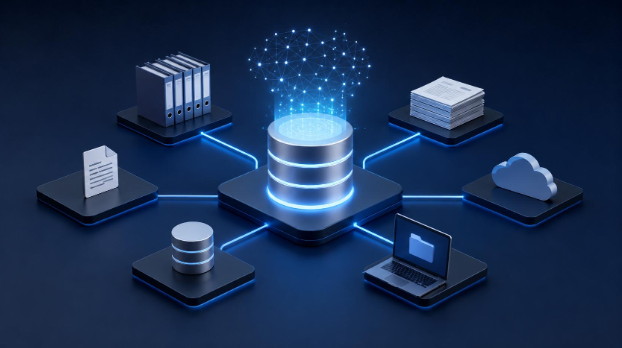
Sources may include PDF files, Word documents, product catalogs, websites, internal knowledge bases, and approved databases.
The system extracts information from these sources and prepares it for processing.
Step 2: Process and Index Content
The system divides documents into smaller sections called chunks. An embedding model converts these sections into numerical representations that help identify semantically related information.
These representations, along with relevant metadata, are stored in a vector database or another retrieval system.
Step 3: Retrieve Relevant Information
When a user submits a question, the retrieval system searches the indexed knowledge base for relevant information.
Depending on the implementation, it can use semantic search, keyword search, metadata filters, or a combination of retrieval methods.
Enterprise applications should also enforce document access permissions during this stage.
Step 4: Generate an AI Response
Add the retrieved information to the prompt sent to the language model.
The model uses this context to generate a response based on the available evidence. Applications can also instruct the model to provide source references or acknowledge when it lacks sufficient information.
Step 5: Evaluate and Improve
A production RAG system needs continuous evaluation.
Teams should monitor retrieval relevance, answer accuracy, access permissions, response time, and performance as business documents change.
3. Five Enterprise Applications of RAG
RAG can support several business operations by making organizational information easier to access.
1. Internal Knowledge Assistants
Employees can ask questions about company policies, onboarding materials, internal procedures, and operational documents without manually searching through multiple files.
2. AI-Powered Customer Support
Customer support systems can retrieve relevant product documentation, troubleshooting instructions, and approved answers to help support teams respond more efficiently.
3. E-commerce Product Assistants
E-commerce businesses can use RAG to answer customer questions about product specifications, compatibility, features, shipping policies, and product documentation.
4. Document Intelligence
Businesses can build applications that help authorized users locate relevant clauses, summarize documents, compare information, and identify supporting passages for further review.
5. Technical Knowledge Systems
Development teams can use RAG to search API documentation, architecture notes, technical guides, and troubleshooting resources through natural-language questions.
4. RAG vs Fine-Tuning: What's the Difference?
RAG and fine-tuning are two different approaches to improving AI applications.
RAG provides a language model with relevant external information at query time. It is particularly useful when information changes frequently, or answers need to reference company-specific documents.
Fine-tuning uses additional training examples to adapt a model's behavior, response style, or performance on specialized tasks.
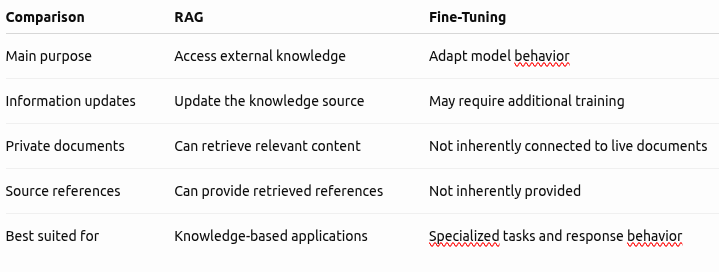
Some enterprise applications benefit from combining both approaches when they require access to business knowledge and specialized model behavior.
5. Common Challenges in RAG Implementation
Building a reliable RAG application requires more than connecting a language model to a vector database.
Businesses should consider several implementation challenges:
- Poor document extraction: Tables, scanned PDFs, and complex layouts can lose important information during processing.
- Incorrect chunking: Poorly divided content can separate related information and reduce retrieval quality.
- Weak retrieval: Relevant information may not appear in search results.
- Outdated documents: Conflicting or obsolete content can lead to unreliable responses.
- Missing permissions: Incorrect access controls can expose restricted business information.
- Unsupported answers: Language models may generate assumptions beyond the retrieved evidence.
- Performance and costs: Inefficient retrieval and excessive context can increase response times and infrastructure costs.
Addressing these challenges through proper architecture, testing, monitoring, and access control is essential for enterprise applications.
6. How to Build a Production-Ready RAG Application
Building a production-ready RAG solution starts with understanding the business problem, not choosing an AI model immediately.
Here are the important implementation stages:
- Define the use case: Identify whether the application will support internal knowledge search, customer support, document intelligence, or another business workflow.
- Identify data sources: Select approved documents, databases, and knowledge repositories.
- Design the retrieval architecture: Choose suitable document processing, chunking, embedding, and retrieval strategies.
- Integrate the language model: Connect an appropriate LLM to the retrieval pipeline and define response instructions.
- Develop the application interface: Build an intuitive interface that allows users to ask questions and access relevant answers.
- Implement security and permissions: Ensure users can retrieve only the information they are authorized to access.
- Test and monitor: Evaluate realistic questions, retrieval quality, response accuracy, performance, and missing-information scenarios.
A successful RAG system should also support document updates, error monitoring, and a clear process for handling questions it cannot answer reliably.
The objective is not simply to connect AI with business data. It is to create a useful, secure, and dependable knowledge platform.
Frequently Asked Questions
What does RAG stand for in AI?
RAG stands for Retrieval-Augmented Generation. It is an AI architecture that retrieves relevant information from external knowledge sources and provides that context to a language model when generating responses.
Why is RAG important for enterprise AI?
RAG lets enterprise AI applications access company-specific information, including internal documents, policies, and product knowledge. It can make AI assistants more relevant to business requirements without retraining the underlying model whenever information changes.
Does RAG reduce AI hallucinations?
RAG can help reduce unsupported responses by providing relevant source information to the language model. However, it does not eliminate hallucinations. Poor retrieval, incomplete documents, and model limitations can still produce incorrect answers.
What is the difference between RAG and a vector database?
RAG is an overall AI application architecture involving retrieval and response generation. A vector database is one possible component for storing and retrieving numerical representations of documents.
Can RAG work with private company data?
Yes. RAG applications can connect to approved private knowledge sources. However, secure implementation requires authentication, authorization, permission-aware retrieval, and appropriate data protection controls.
Conclusion: Build Smarter Enterprise AI With RAG
Retrieval-Augmented Generation is helping businesses make AI applications more useful by connecting language models with relevant organizational knowledge.
At Vision Vivante, we help businesses explore and develop AI-powered applications, custom RAG systems, document intelligence solutions, and software integrations designed around real business requirements.
Whether you want to build an internal AI knowledge assistant, automate information retrieval or develop a custom enterprise AI application, our team can help turn your requirements into a practical technology solution.
Discuss your AI and RAG development project with Vision Vivante today.